

Reviewed by Ric Guides Editorial Team
⭐ Ric Guides Verdict
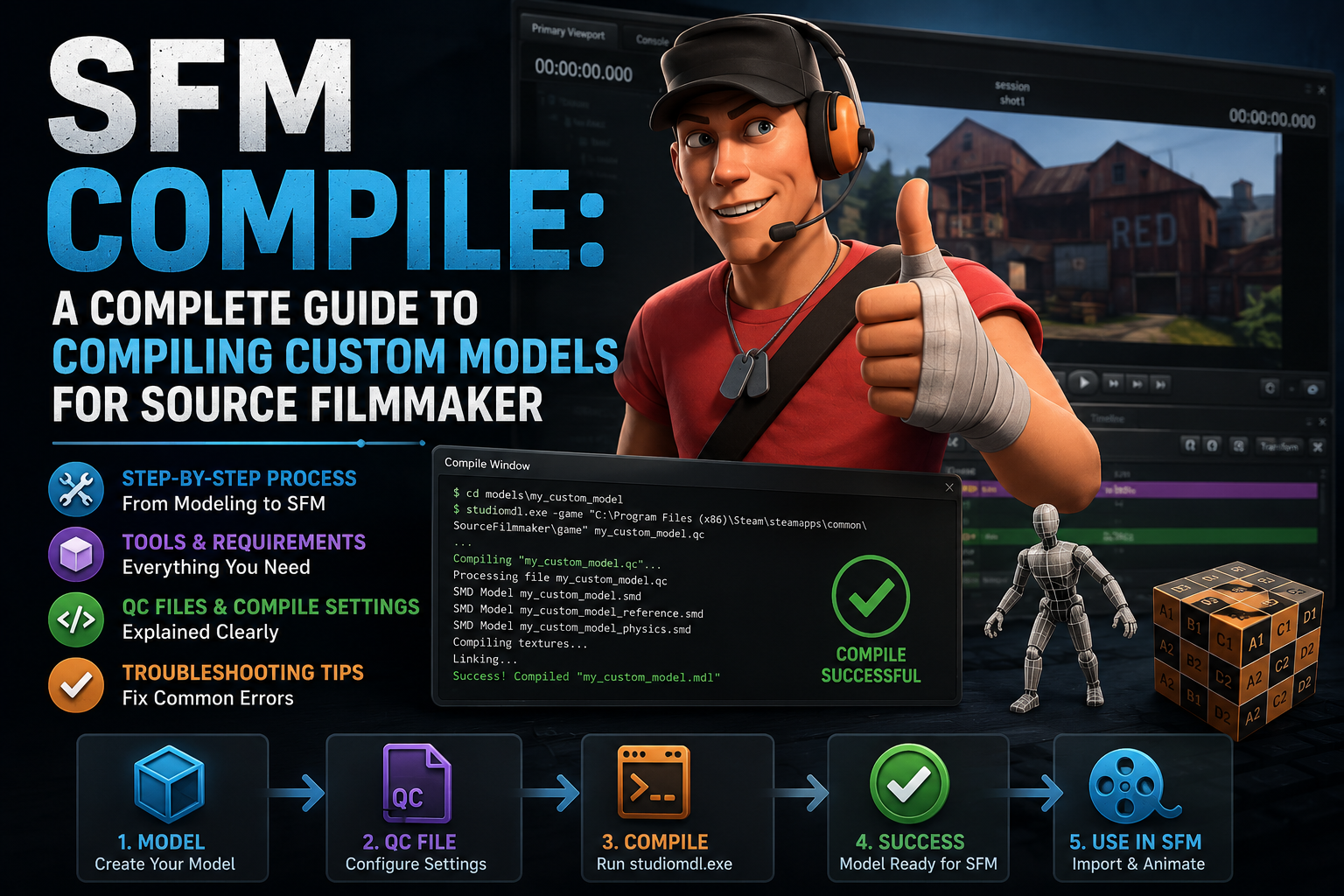
SFM Compile provides a useful resource for Source Filmmaker users who want to understand custom model compiling workflows. The guide focuses on helping creators manage models, fix compatibility issues, and improve their SFM projects.
It is most valuable for beginners and intermediate users looking for a structured explanation of the compiling process.
Rating: ⭐⭐⭐⭐☆ 4.4/5
Introduction
Source Filmmaker (SFM) gives creators the ability to build cinematic animations using assets from the Source engine. However, adding custom characters, props, or weapons requires an important process known as SFM compile.
This process converts custom 3D models into a format that SFM can properly recognize. Without correct compiling, creators may face issues like missing textures, broken animations, or models failing to load.
In this guide, we cover the SFM compile workflow, required tools, common errors, and practical tips to help creators successfully add custom assets to their projects.
Understanding SFM Compile and Its Role in Source Filmmaker
At its core, SFM compile is the conversion process that takes a 3D asset built in external software and turns it into a format the Source engine can actually read. Source Filmmaker doesn’t work directly with native files from programs like Blender, Maya, or 3ds Max. It needs a compiled model — a package that bundles geometry, skeletal data, animation sequences, material links, and physics information into engine-ready files.
Without compilation, even a perfectly modeled and textured character is just raw data sitting outside SFM’s ecosystem. Compiling is the bridge that turns creative work into something the software can render, animate, and interact with.
How SFM Compile Works Inside the Source Engine Pipeline
The Source engine relies on a chain of file types that each play a specific role in the pipeline:
| File Type | Purpose |
|---|---|
| SMD | Stores model geometry and animation data |
| DMX | Modern Source format for models and animations |
| QC | Instructions used by the compiler |
| MDL | Main compiled model file |
| VTX | Handles mesh optimization and rendering data |
| VVD | Stores vertex information |
The compiler doesn’t guess anything — it strictly follows what’s written in the QC file. If a texture path, bone reference, or animation sequence is missing or mistyped, the compilation either fails outright or produces a broken model. This is why most compile issues trace back to the QC script rather than the 3D model itself.
Essential Software and Tools Required for SFM Compile
Before diving into compilation, it helps to have the right toolkit assembled. Each tool covers a different stage of the process, from modeling to scripting to the actual build.
StudioMDL Command Line Utility
StudioMDL is Valve’s native compiler and the tool that ultimately turns your QC file into a usable MDL. It runs through the command line, reading your QC instructions and assembling the final model package. While it’s not the friendliest tool for beginners, it remains the engine at the heart of every SFM compile, even when other software is used as a front end.
Crowbar Compilation Tool
Crowbar has become the go-to utility for most SFM and Source engine artists because it wraps StudioMDL in a graphical interface. Instead of typing commands manually, you can select your QC file, choose the correct game/engine build, and trigger compilation with a click. Crowbar also makes it easier to read error logs and decompile existing models, which is valuable for troubleshooting and learning from reference assets.
3D Creation Software for SFM Compile
Your model has to originate somewhere, and that’s where programs like Blender, Maya, or 3ds Max come in. These tools handle the creative side — building geometry, unwrapping UVs, painting textures, rigging skeletons, and creating animations. A model that’s rigged and weighted properly here will save enormous amounts of troubleshooting time later.
Text Editors and QC File Creation
Because QC files are plain text scripts, you’ll need a solid text editor rather than a word processor. Notepad++, Visual Studio Code, and Sublime Text are common choices, largely because they offer syntax highlighting and make it easier to spot formatting mistakes before they cause a failed compile.
Step-by-Step SFM Compile Process
Preparing Your 3D Assets
Everything starts with a clean model. That means correct scale, sensible topology, finished UV mapping, and a properly built skeleton if the asset needs to animate. No compiler can fix a poorly constructed model — it can only package whatever you give it.
Exporting Model Files
Once your asset is ready, export it into an SMD or DMX format. This step deserves close attention to bone naming, animation frame ranges, and material assignments, since export errors tend to surface much later during compilation or in-engine testing.
Creating the QC File
The QC file ties every exported piece together. A basic script defines the model’s output name, references the body geometry, points to the material directory, and lists any animation sequences to include. Even a small typo in a path or filename can stop the entire build.
Running Compiler Operations
With your QC file finished, you can compile either directly through StudioMDL’s command line or through Crowbar’s interface. Watching the compiler log closely is important here — the messages it produces almost always point directly to the file, path, or line causing trouble.
Testing the Finished Model
After a successful compile, move the output files into the correct SFM directories and load the asset in-session. Confirm that the model appears, textures render correctly, animations play as expected, and bones move properly. Testing isn’t a final formality — it’s often where you’ll catch issues that only become obvious once the model is actually in motion.
Best Practices for Successful SFM Compile
Keep Files Organized
A predictable folder structure — separate directories for models, materials, scripts, and animations — prevents a huge share of path-related errors before they even happen.
Use Consistent Naming
Avoid spaces, duplicate filenames, or inconsistent labeling. Version-based naming, such as adding “v1,” “v2,” or “final” to a filename, keeps your project easy to navigate as it grows.
Optimize Models Before Compilation
High polygon counts and oversized textures can slow down both the compile process and SFM’s performance. Cleaning up hidden geometry, trimming unnecessary polygons, and compressing textures keeps your assets efficient without a noticeable drop in visual quality.
Common SFM Compile Errors and Solutions
Certain problems come up again and again for new users:
| Issue | Likely Cause | Fix |
|---|---|---|
| Missing textures | Incorrect material paths | Recheck VMT/VTF file locations |
| Invisible model | Broken materials or failed compile | Review QC settings carefully |
| StudioMDL errors | Wrong or missing file paths | Correct the references in your QC file |
| Broken animations | Export issues | Re-check the skeleton and export settings |
| Compile crashes | Excessive polygon count | Optimize and simplify the model |
Most of these errors trace back to a mismatch between what the QC file expects and what actually exists in the project folder, which is why careful organization pays off repeatedly.
Advanced SFM Compile Techniques
Custom Animation Compilation
Beyond a basic idle pose, QC scripts can integrate walk cycles, facial expressions, and full action sequences through the $sequence command, giving characters a much wider range of motion inside SFM.
Creating Custom Physics Models
Adding a collision model allows an asset to behave realistically — reacting to movement, interacting with other objects, and responding correctly to hit detection, rather than behaving as a static, non-interactive shape.
Using Multiple Skins and Body Groups
More advanced models often support variations like alternate outfits, different color schemes, or removable accessories. Building these options into your QC file gives a single compiled model far more flexibility across different scenes.
Beginner Workflow: Where to Start With SFM Compile
Begin With a Low-Polygon Model
Start small. A simple prop or basic object teaches the fundamentals of the pipeline without the added complexity of rigging and animation.
Install and Organize Tools
Set up Source Filmmaker, Crowbar, StudioMDL, and any export plugins your 3D software needs, and organize them in a consistent workspace from day one.
Create Your First QC File
Write your QC script by hand rather than relying entirely on automated tools. Understanding the structure firsthand makes it much easier to troubleshoot later.
Compile, Test, and Repeat
Expect a cycle: model, export, script, compile, test, fix, repeat. Each pass through this loop builds familiarity with how small changes affect the final result.
Study Existing Models as References
Looking at how other compiled models are structured — their folder layout, QC organization, and material setup — is one of the fastest ways to learn good habits, as long as you respect the original creators’ work.
SFM Compile Compared With Modern Game Engine Workflows
| Aspect | SFM Compile | Modern Engine Workflow |
|---|---|---|
| Primary format | MDL | FBX/glTF |
| Compiler | StudioMDL | Built-in importer |
| Script requirement | QC file required | Often optional |
| Target platform | Source Engine | Unity/Unreal |
Compared to newer engines with drag-and-drop importers, the Source pipeline asks for more manual setup. In exchange, it gives creators granular, file-level control over exactly how a model is built.
Frequently Asked Questions About SFM Compile
What does SFM Compile mean?
It refers to the process of converting a custom 3D asset into a Source engine-compatible model file that can be loaded and used inside Source Filmmaker.
Do I need programming skills for SFM Compile?
No. You don’t need to code — you just need to understand basic QC script structure and keep your files organized correctly.
Is Crowbar required?
Not strictly, but it significantly simplifies the compilation process compared to running StudioMDL manually through the command line.
Can Blender models work with Source Filmmaker?
Yes. Blender models can be exported into SMD or DMX format and compiled into MDL files for use in SFM.
Why are my textures missing after compilation?
This almost always comes down to incorrect material paths or texture files sitting in the wrong directory relative to what the QC file specifies.
How long does SFM Compile take?
Simple props typically compile in seconds. Detailed characters with multiple animation sequences can take noticeably longer, depending on complexity.
Conclusion: Mastering SFM Compile for Better Source Filmmaker Projects
SFM compile might look intimidating at first glance, but it breaks down into a manageable, repeatable process once you understand the pieces involved: clean assets, accurate exports, a well-written QC file, and reliable compiler tools. Start with something small, get comfortable with the workflow, and gradually work your way up to more complex characters and animations. Once the pipeline clicks, compiling stops being a technical hurdle and becomes just another step in bringing your creative ideas to life inside Source Filmmaker.
